New Year, New Prompt ☕️
Every new year I tend to do a bit of housekeeping — not just in Azure subscriptions or GitHub repos, but also in the tools I stare at every single day. One of those tools is my terminal prompt, powered by Oh My Posh.
If you live in a terminal (PowerShell, Bash, Zsh, WSL… pick your poison), your prompt matters more than you might think. It’s not just aesthetics — it’s signal. The right information, at the right time, without slowing you down.
Why Oh My Posh?
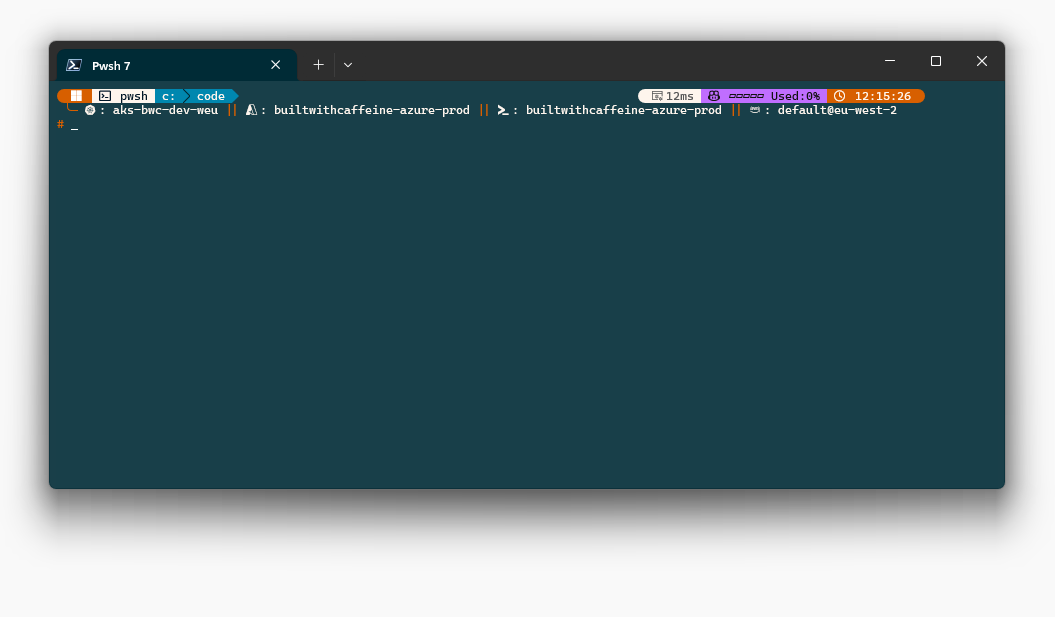
I’ve been using a custom Oh My Posh profile for around four years now, and honestly, it’s one of those things that once you have it dialled in, you can’t go back.
When you’re working with multiple cloud customers, multiple Azure subscriptions, and multiple Kubernetes clusters, context switching becomes the real danger — not the tooling itself. One wrong kubectl apply or az group delete in the wrong tenant is all it takes to ruin your day.
That’s exactly where a well-designed prompt becomes invaluable.
Why Prompt Context Matters
Looking at the prompt in the screenshot, I can immediately see:
Shell & platform I’m in
pwshon Windows.Working directory I’m inside my
C:\codeworkspace.Kubernetes (AKS) context
- Cluster:
aks-bwc-dev-weu
- Cluster:
Azure context
- Subscription name
- Azure CLI Context
- Az (Pwsh) Module Context
AWS context
- Active region (
eu-west-2)
- Active region (
All of that is visible before I type a single command.
The prompt answers the question: “Where am I about to make changes?”, before I make them.
Kubernetes Context: Avoiding Expensive Mistakes
When you’re jumping between clusters—dev, acc, prod, and multiple customers—running kubectl config current-context is too slow and far too easy to forget.
By surfacing this directly in the prompt:
- You always know which cluster you’re targeting
- You’re far less likely to:
- Deploy to production instead of development
- Run destructive commands in the wrong environment
- Debug the wrong cluster for 20 minutes
Azure & AWS Context: Same Problem, Same Solution
The same problem exists outside Kubernetes:
- Multiple Azure tenants and subscriptions
- Multiple AWS accounts and regions
- Multiple Entra ID tenants
By pulling this information dynamically into Oh My Posh, I can immediately tell:
- Which subscription or tenant I’m logged into
- Whether I’m in a production or non-production environment
This becomes especially valuable when consulting, where switching customers multiple times a day is completely normal.
Why Oh My Posh Works So Well for This
Oh My Posh is particularly strong here because:
- It’s shell-agnostic (PowerShell, Bash, Zsh, etc.)
- Segments are fully scriptable
- You can:
- Query
kubectl - Query Azure CLI or AWS CLI
- Cache results for performance
- Apply conditional styling based on environment
- Query
The result is a prompt that becomes a safety dashboard, not just decoration.
What Changed Going Into 2026
- The previous 2025 theme, Had been hacked and modified based on the Quick Term theme from awhile ago, but I’d heard there had been an overview migration update for the Json configuration from v3 to v4, So during the festive break, I figured I’d have a look into this and see how easy it would be to move from v3 to v4, In short pretty easy :D
- GitHub Copilot Support Dccs Link
Goals for this refresh
- Migrate from the v3 to v4 Theme.
- Clean Up the overall UI of the Profile
- Include the GitHub Copilot Premium counter
Theme Philosophy
I tend to treat my Oh My Posh config the same way I treat infrastructure code:
- Explicit over clever
- Readable over compressed
- Predictable over magical
That means:
- Clear blocks
- Minimal conditional logic
- Icons that reinforce meaning, not decoration
- No “just because it looks cool” segments
If something doesn’t earn its place on the prompt, it gets removed.
Fonts & Terminal Setup
This configuration assumes:
- A Nerd Font, I’m currently using Cascadia Code
- Windows Terminal (Stable Release)
- Solarized Dark (Customised)
If you don’t have a Nerd Font installed, some icons will look… interesting for sure! But this said, If you want to enhance your terminal session, check out the Nerd Font website, https://www.nerdfonts.com/font-downloads
The 2026 Oh My Posh Configuration
Below is my current Oh My Posh JSON configuration, as of January 2026.
Feel free to:
- Copy it
- Fork it
- Break it
- Improve it
- Or ruthlessly strip it down to your own taste
Prompts are personal — treat this as inspiration, not gospel.
C:\Users\%UserName%\AppData\Local\Programs\oh-my-posh\themes
quick-term-cloud.omp.json
| |
Final Thoughts
Oh My Posh is one of those tools that rewards small, regular tweaks. You don’t need to reinvent your prompt every month — but giving it a yearly refresh keeps it aligned with how you actually work, not how you worked six projects ago.
FOr some more useful reading, You can check out the following links
- Offical Site: https://ohmypo.sh/
- Themes: https://ohmypo.sh/docs/themes
- GitHub Repository: https://github.com/jandedobbeleer/oh-my-posh
- Oh My Posh - Sponsorship: https://github.com/sponsors/JanDeDobbeleer
- Jan De Dobbeleer (Owner): https://github.com/JanDeDobbeleer
Here’s to fewer broken shells, faster prompts, and better caffeine-fuelled terminals in 2026 ☕️🚀