Introduction
Back in January 2025, Microsoft released the initial modules for Microsoft Graph, This was a game changing improvement, Or well I thought it was. This meant that we could now stream line the IaC deployments and create Entra Id resources direct within Bicep, where as in the past you would have had to use AzCLI and then pass in the Guid Values…
Now for the most part, the resource templates provided work well, apart from if you want to be able to assign Entra Id Roles to Security Groups.
For those who have not yet seen the Microsoft.Graph resource templates, you can check them out over here.
And for those who love change logs and to see what’s been updated, You want to click here.
The Problem
In a recent project, I ran into an issue while creating security groups.
In the documentation for the Security Group module, you’ll see this value: isAssignableToRole: bool.
For anyone new to this, that value should let you assign Entra ID roles such as Global Reader or User Account Administrator to a security group. Sounds ideal, right? Well… not quite.
If you check the Known Issues, at the time of writing (July 2026), you’ll find this snippet:
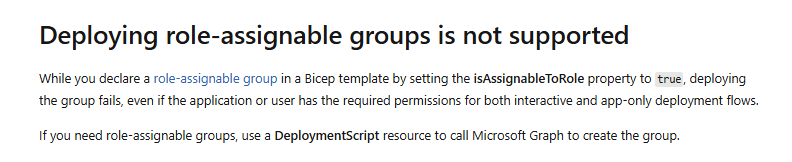
At that point, you can probably guess where this post is going 😏
The Solution
I decided to build some custom modules to resolve this problem and ideally keep it all with in IaC.
Below is a list of the custom modules and code snippets to kick start your deployment 🎉
Custom Modules
Module Folder Structure
For this layout, create the following folders:
infra/modules/microsoft-graph/app-role-assignmentsinfra/modules/microsoft-graph/groupsinfra/modules/microsoft-graph/service-principalsinfra/modules/microsoft-graph/service-principals/lookup
Required Files
To keep things simple, these are the four local main.bicep files you need for an end-to-end deployment:
bicepconfig.jsoninfra/main.bicepinfra/modules/microsoft-graph/groups/AssignableToEntraRole/main.bicepinfra/modules/microsoft-graph/service-principals/lookup/main.bicepinfra/modules/microsoft-graph/app-role-assignments/main.bicep
bicepconfig.json
1
2
3
4
5
| {
"extensions": {
"microsoftGraphV1_0": "br:mcr.microsoft.com/bicep/extensions/microsoftgraph/v1.0:1.0.0"
}
}
|
File Location: ./infra/main.bicep
main.bicep
  1
  2
  3
  4
  5
  6
  7
  8
  9
 10
 11
 12
 13
 14
 15
 16
 17
 18
 19
 20
 21
 22
 23
 24
 25
 26
 27
 28
 29
 30
 31
 32
 33
 34
 35
 36
 37
 38
 39
 40
 41
 42
 43
 44
 45
 46
 47
 48
 49
 50
 51
 52
 53
 54
 55
 56
 57
 58
 59
 60
 61
 62
 63
 64
 65
 66
 67
 68
 69
 70
 71
 72
 73
 74
 75
 76
 77
 78
 79
 80
 81
 82
 83
 84
 85
 86
 87
 88
 89
 90
 91
 92
 93
 94
 95
 96
 97
 98
 99
100
101
102
103
104
105
106
107
108
109
110
111
112
113
114
115
| targetScope = 'subscription'
@description('Primary Azure region for resources.')
param location string = 'westeurope'
@description('Workload short name used for CAF-aligned resource naming.')
param workloadName string = 'bwc'
@description('Application/platform short name used for CAF-aligned resource naming.')
param applicationName string = 'msgraph'
@description('Environment short name used for CAF-aligned resource naming (for example: dev, test, prod).')
@allowed([
'dev'
'test'
'prod'
])
param environmentName string = 'dev'
@description('Region abbreviation used in resource names (for example: weu for West Europe).')
param regionAbbreviation string = 'weu'
@description('Display name for the role-assignable Entra security group.')
param entraGroupDisplayName string = 'BWC - User Account Administrators'
@description('Mail nickname (alias) for the role-assignable Entra security group.')
param entraGroupMailNickname string = 'bwc-user-account-admins'
@description('Object IDs to set as members of the Entra security group.')
param memberObjectIds array = []
@description('Directory scope for Entra role assignments. Use / for tenant-wide scope.')
param entraRoleDirectoryScopeId string = '/'
@description('Entra role definition IDs assigned to the created role-assignable group.')
param entraRoleDefinitionIds array = [
'fe930be7-5e62-47db-91af-98c3a49a38b1' // User Administrator
]
@description('Microsoft Graph application (client) ID. This is the well-known ID for Microsoft Graph in all tenants.')
param microsoftGraphAppId string = '00000003-0000-0000-c000-000000000000'
@description('Microsoft Graph app roles assigned to the managed identity so deployment scripts can manage Entra groups/roles.')
param umiGraphAppRoles array = [
{ id: '9e3f62cf-ca93-4989-b6ce-bf83c28f9fe8', name: 'RoleManagement.ReadWrite.Directory' }
{ id: '62a82d76-70ea-41e2-9197-370581804d09', name: 'Group.ReadWrite.All' }
{ id: 'dbaae8cf-10b5-4b86-a4a1-f871c94c6695', name: 'GroupMember.ReadWrite.All' }
{ id: '9a5d68dd-52b0-4cc2-bd40-abcf44ac3a30', name: 'Application.Read.All' }
]
// CAF-aligned naming composition
var namingSuffix = '${workloadName}-${applicationName}-${environmentName}-${regionAbbreviation}'
var resourceGroupName = 'rg-${namingSuffix}'
var userManagedIdentityName = 'id-${namingSuffix}'
var entraGroupModuleName = 'create-entra-security-group'
module createResourceGroup 'br/public:avm/res/resources/resource-group:0.4.3' = {
params: {
name: resourceGroupName
location: location
}
}
module createUserManagedIdentity 'br/public:avm/res/managed-identity/user-assigned-identity:0.5.1' = {
name: 'create-user-managed-identity'
scope: resourceGroup(resourceGroupName)
params: {
name: userManagedIdentityName
location: location
}
dependsOn: [
createResourceGroup
]
}
@description('Look up the Microsoft Graph service principal (object ID varies per tenant)')
module lookupGraphServicePrincipal 'modules/microsoft-graph/service-principals/lookup/main.bicep' = {
name: 'lookup-graph-service-principal'
scope: resourceGroup(resourceGroupName)
params: {
appId: microsoftGraphAppId
}
dependsOn: [
createUserManagedIdentity
]
}
@description('Assign Microsoft Graph permissions to the user-managed identity')
module assignUmiGraphPermissions 'modules/microsoft-graph/app-role-assignments/main.bicep' = [for (role, i) in umiGraphAppRoles: {
name: 'assign-graph-perm-${i}'
scope: resourceGroup(resourceGroupName)
params: {
principalId: createUserManagedIdentity.outputs.principalId
resourceId: lookupGraphServicePrincipal.outputs.objectId
appRoleId: role.id
}
}]
module createEntraSecurityGroup 'modules/microsoft-graph/groups/AssignableToEntraRole/main.bicep' = {
name: entraGroupModuleName
scope: resourceGroup(resourceGroupName)
params: {
name: entraGroupModuleName
location: location
displayName: entraGroupDisplayName
mailNickname: entraGroupMailNickname
memberObjectIds: memberObjectIds
entraRoleDirectoryScopeId: entraRoleDirectoryScopeId
entraRoleDefinitionIds: entraRoleDefinitionIds
userManagedIdentityName: createUserManagedIdentity.outputs.name
}
dependsOn: [
assignUmiGraphPermissions
]
}
|
File Location: infra/modules/microsoft-graph/groups/AssignableToEntraRole/main.bicep
AssignableToEntraRole - main.bicep
  1
  2
  3
  4
  5
  6
  7
  8
  9
 10
 11
 12
 13
 14
 15
 16
 17
 18
 19
 20
 21
 22
 23
 24
 25
 26
 27
 28
 29
 30
 31
 32
 33
 34
 35
 36
 37
 38
 39
 40
 41
 42
 43
 44
 45
 46
 47
 48
 49
 50
 51
 52
 53
 54
 55
 56
 57
 58
 59
 60
 61
 62
 63
 64
 65
 66
 67
 68
 69
 70
 71
 72
 73
 74
 75
 76
 77
 78
 79
 80
 81
 82
 83
 84
 85
 86
 87
 88
 89
 90
 91
 92
 93
 94
 95
 96
 97
 98
 99
100
101
102
103
104
105
106
107
108
109
110
111
112
113
114
115
116
117
118
119
120
121
122
123
124
125
126
127
128
129
130
131
132
133
134
135
136
137
138
139
140
141
142
143
144
145
146
147
148
149
150
151
152
153
154
155
156
157
158
159
160
161
162
163
164
165
166
167
168
169
170
171
172
173
174
175
176
177
178
179
180
181
182
183
184
185
186
187
188
189
190
191
192
193
194
195
196
197
198
199
200
201
202
203
204
205
206
207
208
209
210
211
212
213
214
215
216
217
218
219
220
221
222
223
224
225
226
227
228
229
230
231
232
233
234
235
236
237
238
239
240
241
242
243
244
245
246
247
248
249
250
251
252
253
254
255
256
257
258
259
260
261
262
263
264
265
266
267
268
269
270
271
272
| targetScope = 'resourceGroup'
@description('Name of the deployment script resource.')
param name string
@description('Deployment location for the deployment script resources.')
param location string = resourceGroup().location
@description('Display name for the Microsoft Entra group.')
param displayName string
@description('Mail nickname (alias) for the Microsoft Entra group.')
param mailNickname string
@description('Object IDs to set as group members.')
param memberObjectIds array = []
@description('Microsoft Entra role definition IDs to assign to the group (optional).')
param entraRoleDefinitionIds array = []
@description('Directory scope ID for Entra role assignments. Use / for tenant-wide scope.')
param entraRoleDirectoryScopeId string = '/'
@description('Existing user-assigned managed identity name used by the deployment script runtime.')
param userManagedIdentityName string
@description('Unique run identifier used to force re-execution when needed.')
param scriptRunId string = utcNow('u')
resource userManagedIdentity 'Microsoft.ManagedIdentity/userAssignedIdentities@2024-11-30' existing = {
name: userManagedIdentityName
}
resource createRoleAssignableGroupScript 'Microsoft.Resources/deploymentScripts@2023-08-01' = {
name: name
location: location
kind: 'AzureCLI'
identity: {
type: 'UserAssigned'
userAssignedIdentities: {
'${userManagedIdentity.id}': {}
}
}
properties: {
azCliVersion: '2.80.0'
timeout: 'PT30M'
cleanupPreference: 'OnSuccess'
retentionInterval: 'P1D'
forceUpdateTag: scriptRunId
environmentVariables: [
{
name: 'GROUP_DISPLAY_NAME'
value: displayName
}
{
name: 'GROUP_MAIL_NICKNAME'
value: mailNickname
}
{
name: 'GROUP_MEMBER_OBJECT_IDS'
value: string(memberObjectIds)
}
{
name: 'GROUP_ENTRA_ROLE_DEFINITION_IDS'
value: string(entraRoleDefinitionIds)
}
{
name: 'GROUP_ENTRA_ROLE_DIRECTORY_SCOPE_ID'
value: entraRoleDirectoryScopeId
}
]
scriptContent: '''
#!/usr/bin/env bash
set -euo pipefail
display_name="$GROUP_DISPLAY_NAME"
mail_nickname="$GROUP_MAIL_NICKNAME"
members_json="$GROUP_MEMBER_OBJECT_IDS"
role_definition_ids_json="$GROUP_ENTRA_ROLE_DEFINITION_IDS"
directory_scope_id="$GROUP_ENTRA_ROLE_DIRECTORY_SCOPE_ID"
log() { echo "[$(date -u '+%H:%M:%S')] $*"; }
section() { echo ""; echo "=== $* ==="; }
# ── GROUP ────────────────────────────────────────────────────────────
section "Group"
log "Target: '${display_name}' (mailNickname: ${mail_nickname})"
existing_group_id=$(az rest \
--method GET \
--url "https://graph.microsoft.com/v1.0/groups?\$filter=mailNickname eq '${mail_nickname}'&\$select=id,displayName,mailNickname" \
--query "value[0].id" \
--output tsv || true)
if [[ -z "${existing_group_id}" ]]; then
log "Group not found — creating..."
create_body=$(jq -n \
--arg displayName "${display_name}" \
--arg mailNickname "${mail_nickname}" \
'{
displayName: $displayName,
mailEnabled: false,
mailNickname: $mailNickname,
securityEnabled: true,
isAssignableToRole: true,
groupTypes: []
}')
group_json=$(az rest \
--method POST \
--url "https://graph.microsoft.com/v1.0/groups" \
--headers "Content-Type=application/json" \
--body "${create_body}")
group_id=$(echo "${group_json}" | jq -r '.id')
log "Group created id=${group_id}"
else
group_id="${existing_group_id}"
log "Group already exists id=${group_id}"
fi
if [[ -z "${group_id}" || "${group_id}" == "null" ]]; then
log "ERROR: Unable to resolve group id — aborting."
exit 1
fi
# ── MEMBERS ───────────────────────────────────────────────────────────
section "Members"
desired_members=$(echo "${members_json}" | jq -r '.[]?' || true)
if [[ -z "${desired_members}" ]]; then
log "No members configured, skipping."
else
current_members=$(az rest \
--method GET \
--url "https://graph.microsoft.com/v1.0/groups/${group_id}/members?\$select=id" \
--query "value[].id" \
--output tsv || true)
while IFS= read -r member_id; do
if [[ -z "${member_id}" || "${member_id}" == "null" ]]; then
continue
fi
if echo "${current_members}" | grep -Fxq "${member_id}"; then
log "Member ${member_id} already present, skipping."
continue
fi
member_body=$(jq -n --arg id "${member_id}" '{"@odata.id": "https://graph.microsoft.com/v1.0/directoryObjects/\($id)"}')
# Retry with backoff to handle Entra replication lag after object creation
max_attempts=10
attempt=0
while [[ $attempt -lt $max_attempts ]]; do
attempt=$((attempt + 1))
log "Adding member ${member_id} (attempt ${attempt}/${max_attempts})..."
set +e
add_member_output=$(az rest \
--method POST \
--url "https://graph.microsoft.com/v1.0/groups/${group_id}/members/\$ref" \
--headers "Content-Type=application/json" \
--body "${member_body}" \
2>&1)
add_member_exit=$?
set -e
if [[ $add_member_exit -eq 0 ]]; then
log "Member ${member_id} added successfully."
break
fi
# Idempotency: treat duplicate-member response as success
if echo "${add_member_output}" | grep -Eiq "already exist|added object references already exist|Request_BadRequest"; then
log "Member ${member_id} is already present (API duplicate response), skipping."
break
fi
# Retry only for propagation delays where object is not yet resolvable
if echo "${add_member_output}" | grep -Eiq "Request_ResourceNotFound|ResourceNotFound|does not exist"; then
if [[ $attempt -lt $max_attempts ]]; then
sleep_seconds=$((attempt * 20))
log "Object not yet replicated, retrying in ${sleep_seconds}s..."
sleep $sleep_seconds
else
log "Failed to add member ${member_id} after ${max_attempts} attempts."
exit 1
fi
continue
fi
# Unknown error: fail fast instead of sleeping/retrying for minutes
log "Unexpected error while adding member ${member_id}: ${add_member_output}"
exit 1
done
done <<< "${desired_members}"
fi
# ── ROLE ASSIGNMENTS ──────────────────────────────────────────────────
section "Entra Role Assignments"
desired_role_definition_ids=$(echo "${role_definition_ids_json}" | jq -r '.[]?' || true)
if [[ -z "${desired_role_definition_ids}" ]]; then
log "No role assignments configured, skipping."
else
existing_role_definition_ids=$(az rest \
--method GET \
--url "https://graph.microsoft.com/v1.0/roleManagement/directory/roleAssignments?\$filter=principalId eq '${group_id}'&\$select=roleDefinitionId,directoryScopeId" \
--query "value[?directoryScopeId=='${directory_scope_id}'].roleDefinitionId" \
--output tsv || true)
while IFS= read -r role_definition_id; do
if [[ -z "${role_definition_id}" || "${role_definition_id}" == "null" ]]; then
continue
fi
if echo "${existing_role_definition_ids}" | grep -Fxq "${role_definition_id}"; then
log "Role ${role_definition_id} already assigned at scope '${directory_scope_id}', skipping."
continue
fi
role_assignment_body=$(jq -n \
--arg principalId "${group_id}" \
--arg roleDefinitionId "${role_definition_id}" \
--arg directoryScopeId "${directory_scope_id}" \
'{
principalId: $principalId,
roleDefinitionId: $roleDefinitionId,
directoryScopeId: $directoryScopeId
}')
log "Assigning role ${role_definition_id} at scope '${directory_scope_id}'..."
az rest \
--method POST \
--url "https://graph.microsoft.com/v1.0/roleManagement/directory/roleAssignments" \
--headers "Content-Type=application/json" \
--body "${role_assignment_body}" \
>/dev/null
log "Role ${role_definition_id} assigned successfully."
done <<< "${desired_role_definition_ids}"
fi
# ── DONE ──────────────────────────────────────────────────────────────
section "Done"
group_data=$(az rest \
--method GET \
--url "https://graph.microsoft.com/v1.0/groups/${group_id}?\$select=id,displayName,mailNickname")
final_id=$(echo "${group_data}" | jq -r '.id')
final_name=$(echo "${group_data}" | jq -r '.displayName')
log "Group '${final_name}' (id=${final_id}) is fully configured."
jq -n \
--arg resourceId "${final_id}" \
--arg displayName "${final_name}" \
--arg mailNickname "$(echo "${group_data}" | jq -r '.mailNickname')" \
'{
resourceId: $resourceId,
displayName: $displayName,
mailNickname: $mailNickname
}' > "$AZ_SCRIPTS_OUTPUT_PATH"
'''
}
}
@description('Object ID of the group.')
output resourceId string = createRoleAssignableGroupScript.properties.outputs.resourceId
@description('Display name of the group.')
output displayName string = createRoleAssignableGroupScript.properties.outputs.displayName
@description('Mail nickname of the group.')
output mailNickname string = createRoleAssignableGroupScript.properties.outputs.mailNickname
|
File Path: infra/modules/microsoft-graph/service-principals/lookup/main.bicep
Service Principals - Lookup - main.bicep
 1
 2
 3
 4
 5
 6
 7
 8
 9
10
11
12
13
14
15
16
17
| extension microsoftGraphV1_0
metadata name = 'Microsoft Graph service principal lookup'
metadata description = 'Looks up an existing Microsoft Entra service principal by its application (client) ID.'
@description('Application (client) ID of the service principal to look up.')
param appId string
resource servicePrincipal 'Microsoft.Graph/servicePrincipals@v1.0' existing = {
appId: appId
}
@description('Object ID of the service principal.')
output objectId string = servicePrincipal.id
@description('Display name of the service principal.')
output displayName string = servicePrincipal.displayName
|
File Path: infra/modules/microsoft-graph/app-role-assignments/main.bicep
App Role Assignment - main.bicep
 1
 2
 3
 4
 5
 6
 7
 8
 9
10
11
12
13
14
15
16
17
18
19
20
21
22
23
24
25
26
27
28
29
30
31
| extension microsoftGraphV1_0
metadata name = 'Microsoft Graph app role assignment'
metadata description = 'Assigns an application role to a user, group, or service principal by using the Microsoft Graph Bicep extension.'
@description('App role ID to assign.')
param appRoleId string
@description('Object ID of the principal that receives the assignment.')
param principalId string
@description('Object ID of the resource service principal that exposes the app role.')
param resourceId string
resource assignmentResource 'Microsoft.Graph/appRoleAssignedTo@v1.0' = {
appRoleId: appRoleId
principalId: principalId
resourceId: resourceId
}
@description('Object ID of the app role assignment.')
output id string = assignmentResource.id
@description('Principal object ID receiving the role assignment.')
output principalId string = assignmentResource.principalId
@description('Resource service principal object ID exposing the app role.')
output resourceId string = assignmentResource.resourceId
@description('App role ID assigned to the principal.')
output appRoleId string = assignmentResource.appRoleId
|
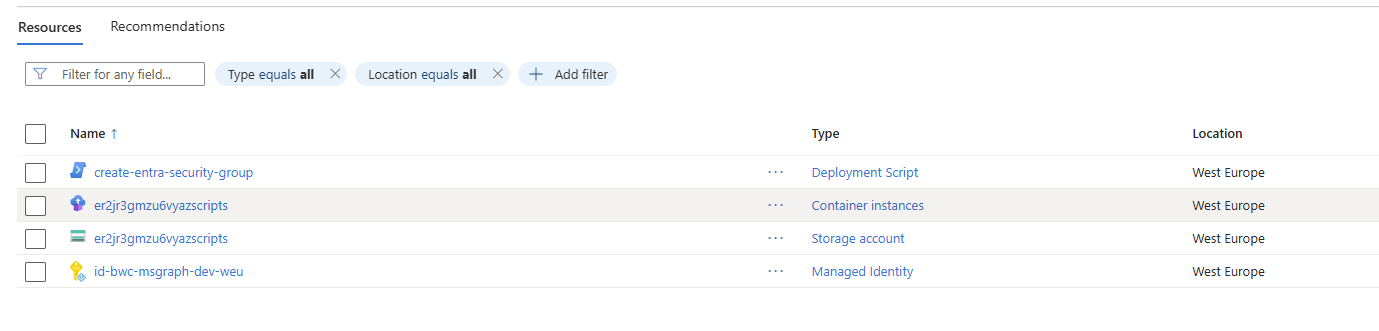
From the infra folder, run this to validate the subscription-scoped deployment with what-if:
az deployment sub create --name 'iac-msgraph-module' --location 'westeurope' --template-file .\main.bicep --what-if
Troubleshooting
Entra Role Permissions
If you don’t assign Privileged Role Administrator (e8611ab8-c189-46e8-94e1-60213ab1f814) to the managed identity used by the deployment script, you’ll see an error like this:
 1
 2
 3
 4
 5
 6
 7
 8
 9
10
11
12
13
14
15
16
17
18
19
20
21
22
23
24
25
26
27
28
29
30
31
32
33
34
35
36
37
38
39
40
41
| Adding certificates not required
Registering and setting the cloud
Cloud is already registered
Registering and setting the cloud completed
=== Group ===
[18:12:20] Target:
Group Name: BWC - User Account Administrators
mailNickname: bwc-user-account-admins
[18:12:21] Group not found — creating...
ERROR: Forbidden
{
"error": {
"code": "Authorization_RequestDenied",
"message": "Insufficient privileges to complete the operation.",
"innerError": {
"date": "2026-07-07T18:12:21",
"request-id": "f06fc9d0-915a-474f-8eca-afc0d2573608",
"client-request-id": "f06fc9d0-915a-474f-8eca-afc0d2573608"
}
}
}
ERROR: Forbidden
{
"error": {
"code": "Authorization_RequestDenied",
"message": "Insufficient privileges to complete the operation.",
"innerError": {
"date": "2026-07-07T18:12:21",
"request-id": "857727a5-5836-41cf-b94e-6f4d99664745",
"client-request-id": "857727a5-5836-41cf-b94e-6f4d99664745"
}
}
}
|
Entra ID Premium (Azure AD P1/P2)
If you get this error, ensure your tenant has an Entra ID P1 or P2 license. MSFT Docs
 1
 2
 3
 4
 5
 6
 7
 8
 9
10
11
12
13
14
15
16
17
18
19
20
21
22
23
24
25
26
27
| Adding certificates not required
Registering and setting the cloud
Cloud is already registered
Registering and setting the cloud completed
=== Group ===
[18:27:34] Target:
Group Name: BWC - User Account Administrators
mailNickname: bwc-user-account-admins
[18:27:35] Group not found — creating...
ERROR: Forbidden
{
"error": {
"code": "Authorization_RequestDenied",
"message": "Only companies who have purchased AAD Premium may perform this operation. paramName: , paramValue: , objectType: ",
"innerError": {
"date": "2026-07-07T18:27:35",
"request-id": "365bffba-d664-49c0-98fc-b48122dd7056",
"client-request-id": "365bffba-d664-49c0-98fc-b48122dd7056"
}
}
}
|
Wrap Up
If you’ve made it this far, you now have a working pattern for deploying role-assignable Entra security groups with IaC, even with the current Graph Bicep limitation.
The key idea is simple:
- keep the deployment orchestration in
infra/main.bicep - use the custom
AssignableToEntraRole module for group creation and role assignment - wire in Graph service principal lookup + app role assignments so the managed identity has what it needs
Once those pieces are in place, the deployment becomes repeatable and far less painful than ad-hoc scripting.
If you hit errors, check permissions and licensing first:
- Managed identity needs
Privileged Role Administrator - Tenant needs Entra ID P1/P2 for role-assignable groups
Hopefully this saves you a few hours of troubleshooting and gives you a solid base to extend in your own environment.
Happy automating 👊