GitHub Actions can authenticate to Azure without storing a long-lived client secret in the repository. With OpenID Connect (OIDC), a workflow requests a short-lived token from GitHub and Microsoft Entra ID exchanges that token for an Azure access token.
That is a much better authentication model than keeping a service principal secret in GitHub. However, the trust relationship still needs to be designed carefully. Microsoft Entra federated identity credentials match claims in the GitHub token, especially the sub (subject) claim. If that subject is built only from repository and owner names, it can change or be recycled.
GitHub now supports an immutable subject format that includes the stable owner and repository IDs. This post explains why that matters and how to migrate an Azure federated identity credential without taking an existing workflow offline.
The problem with name-based subjects
Historically, a GitHub Actions workflow running on the main branch of contoso/payments-api produced a subject similar to this:
| |
The value is readable, but both names are mutable. An organisation or repository can be renamed, transferred, deleted, and potentially recreated. If a federated identity credential remains configured for the old value, a different repository could eventually produce the same subject.
This is known as subject recycling. The credential is still present, but the workload it originally trusted is no longer the workload producing the matching token. A stale credential that trusts a workload that no longer exists is also called a dangling federated identity credential.
The risk is not unique to GitHub. The general rule for workload federation is simple: when an issuer provides a stable identifier, anchor trust to that identifier rather than to a display name or path.
What is an immutable GitHub subject?
The immutable format keeps the names for readability and adds the permanent owner and repository IDs:
| |
For example:
| |
The owner and repository IDs are assigned by GitHub and are not reused. Renaming or transferring the repository therefore does not make the original subject belong to a different repository.
The @ separator is intentional: GitHub usernames and repository names cannot contain it.
For example, the example repository used with this post is builtwithcaffeine/bwc-github-federation-example. The repository includes the branch- and environment-based GitHub Actions workflows discussed in this post, so you can inspect the configuration and try the pattern yourself. Its immutable branch subject is:
| |
The IDs in these examples are illustrative. Always retrieve the current values from GitHub before creating a credential. For example, the GitHub CLI can return the owner and repository IDs together:
IMPORTANT:
Immutable subjects apply to repositories on GitHub.com. They are not available on GitHub Enterprise Server. Existing repositories also keep the old format until they opt in, while repositories created after July 15, 2026 use the immutable format by default.
The branch, tag, environment, or pull request context still appears after the repository segment. Only the identity of the owner and repository becomes immutable.
How the Azure trust relationship works
An Azure federated identity credential normally checks three important values:
- Issuer:
https://token.actions.githubusercontent.com - Subject: the GitHub OIDC
subclaim - Audience:
api://AzureADTokenExchange
The subject should also be scoped as narrowly as the deployment requires. For example, a production deployment from the main branch might trust this exact subject:
| |
If the workflow deploys through a GitHub Environment instead, the subject includes the environment:
| |
Do not use a broad subject just because it is easier to configure. A credential matching every branch or every repository gives a compromised workflow more opportunity to obtain an Azure token.
Prerequisites
Before starting the migration, check the following:
- The repository is hosted on GitHub.com.
- The workflow already uses OIDC or is ready to use it.
- The Microsoft Entra application or user-assigned managed identity has a federated identity credential.
- You have permission to update the GitHub OIDC settings and the Entra application.
- You know the GitHub owner ID and repository ID.
The owner and repository IDs are available through GitHub’s OIDC settings and REST API. GitHub also provides a preview mechanism so that you can confirm the subject a workflow will emit before changing the Entra trust policy.
The migration strategy
The safest migration is additive rather than destructive:
- Get the immutable owner and repository IDs.
- Create a new Entra federated identity credential for the immutable subject.
- Enable immutable subjects for the repository or organisation in GitHub.
- Run the workflow and confirm that Azure authentication succeeds.
- Remove the old name-based credential.
Creating the new credential before changing GitHub keeps the existing workflow working during the transition. Removing the old credential only after a successful run prevents the migration from becoming an unnecessary outage.
Create the immutable federated credential
Save a credential definition such as the following as credential.json. Replace the example values with the IDs and subject for your own repository.
| |
For an Entra application, create the credential with Azure CLI:
| |
The --id value is the object ID of the application, not the application (client) ID. Keep that distinction in mind when scripting the migration.
Create one credential for each subject the workflow can present. For example, a workflow using both a production environment and a staging environment needs a trust entry for each intended subject unless you deliberately use a flexible federated identity credential.
The example repository uses the following environment subjects:
| |
Those subjects allow the Entra application to distinguish between the development and production deployment environments. Create separate credentials when the environments should have different Azure permissions or different trust policies.
Flexible federated identity credentials
If a workflow needs to support multiple branches or tags, a flexible federated identity credential can match the immutable repository prefix while still checking the repository ID separately:
| |
The additional repository_id and repository_owner_id checks make the trust boundary explicit. Use a flexible credential only when the broader matching behaviour is intentional, and keep the expression limited to the repository and owner that should receive access.
Enable immutable subjects in GitHub
Existing repositories can opt in from the repository or organisation Actions OIDC settings. GitHub also exposes API controls and a preview endpoint for checking the resulting subject format.
Before enabling the setting, compare the preview value with the subject in credential.json. This catches common mistakes such as:
- Using the application client ID instead of the GitHub repository ID
- Omitting the owner ID
- Using a branch subject when the workflow actually references an environment
- Forgetting that a pull request has a different subject context
After opt-in, newly issued OIDC tokens use the immutable subject. The workflow itself usually does not need a code change, but it must have permission to request an OIDC token. The following is the branch-based workflow from the example repository:
| |
The id-token: write permission allows the job to request the GitHub token; it does not grant write access to the repository or Azure resources. It can be set at the workflow or individual job level, but it does not enable immutable subject claims. See GitHub’s OIDC workflow permissions guidance. Azure permissions still come from the role assignments on the application or managed identity.
The AZURE_TENANT_ID, AZURE_CLIENT_ID, and AZURE_SUBSCRIPTION_ID values identify the Azure tenant, application, and subscription. They are not client secrets. The OIDC token is what allows Microsoft Entra ID to authenticate the workflow without storing a long-lived credential in the repository.
Environment-based workflow
The second example selects an environment at dispatch time. The job’s environment value changes the GitHub OIDC subject, so the Entra application can use separate credentials for bwc-dev and bwc-prod:
| |
Because the job references the selected environment, GitHub emits an environment subject rather than a branch subject. Configure the bwc-dev and bwc-prod environments with the appropriate protection rules and secrets, then create matching federated credentials in Entra ID.
Validate before deleting the old credential
Run the workflow after enabling immutable subjects and verify both authentication and authorisation:
- The
azure/loginstep completes successfully. - The workflow can perform the expected Azure operation.
- The sign-in or audit logs show the intended application and tenant.
- The workflow is using the expected branch, tag, or environment subject.
If the login fails, compare the token claims with the federated identity credential. GitHub’s actions-oidc-debugger action can help inspect the claims during troubleshooting. Do not leave a token containing sensitive claims in a public workflow log.
Only after a successful run should you remove the old name-based credential:
| |
Removing the old entry matters. Leaving it behind preserves the original mutable trust relationship and means the migration has not fully addressed the subject-recycling risk.
Operational recommendations
Immutable subjects are a useful improvement, but they are not a replacement for a complete workload identity security model:
- Use least privilege. Give the Entra application only the Azure roles required by the deployment.
- Scope the subject. Prefer a specific environment or protected branch over every branch in a repository.
- Protect production environments. Use GitHub Environment approvals and branch restrictions where appropriate.
- Review credentials regularly. Remove federated credentials for retired repositories and workflows.
- Avoid long-lived secrets. Once OIDC is working, remove obsolete service principal secrets from GitHub.
- Treat reusable workflows carefully. If a reusable workflow is part of the trust boundary, consider matching its
job_workflow_refas well. - Document the IDs. Keep the owner and repository IDs with the infrastructure code so a future migration does not depend on guesswork.
Enabling Immutable Subjects in Existing Repositories
Updated: October 2026
While working on a GitHub Actions workflow recently, I ran into an authentication failure after configuring a federated identity credential with the new immutable subject format. Revisiting this post and the GitHub documentation highlighted a detail worth emphasising.
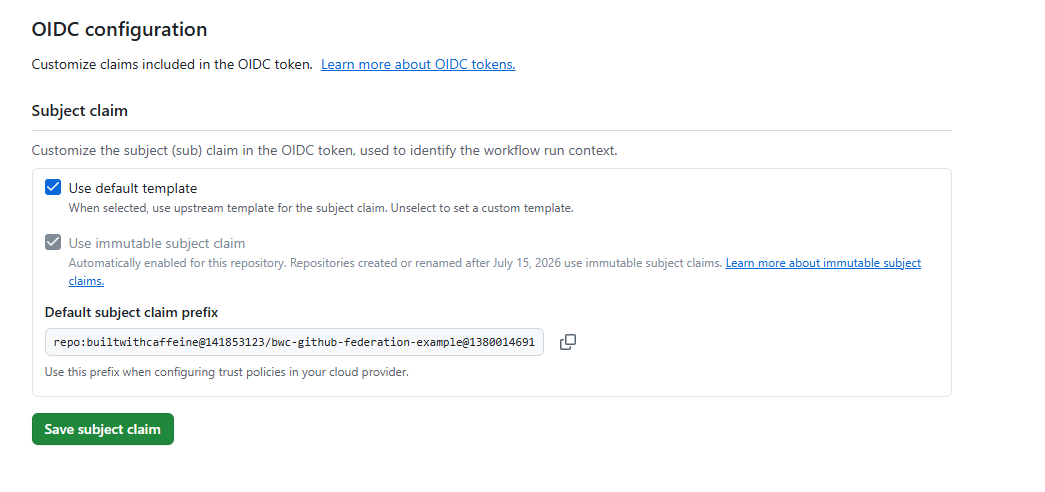
As noted earlier, repositories created after July 15, 2026 use immutable subject claims by default. However, the repository I was working on was created before that date and was still using the name-based subject format.
That meant the subject in the GitHub OIDC token did not match the immutable subject configured in Microsoft Entra ID.
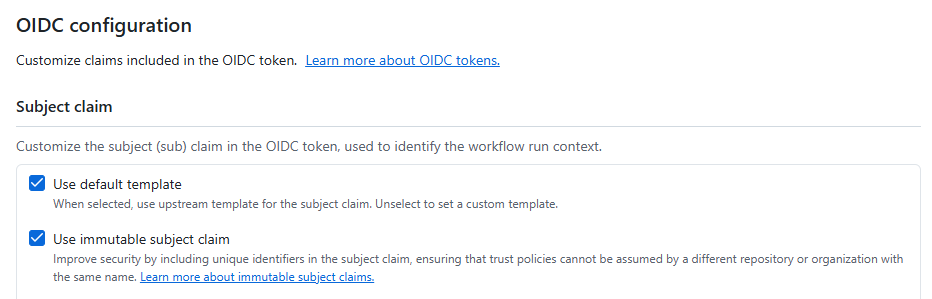
To enable immutable subjects for an existing repository, go to Settings > Actions > OIDC and select Use immutable subject claim.
GitHub also supports opting in at the organisation level or through the REST API. See GitHub’s opt-in guidance for existing repositories for details.
NOTE:
Repositories created before July 15, 2026 retain the name-based format unless they opt in. However, repository renames and transfers after that date also adopt the immutable format, so check the current OIDC configuration rather than relying solely on the repository’s creation date.
Create the matching federated identity credential in Microsoft Entra ID before enabling immutable subjects to avoid interrupting existing workflows.
Conclusion
GitHub Actions OIDC removes the need to store long-lived Azure credentials, but the claims in the token still define the security boundary. A subject based only on names is readable but vulnerable to renames, transfers, deletion, and reuse.
Immutable subjects solve that specific problem by combining the familiar repository name with GitHub’s stable owner and repository IDs. For an existing Azure integration, the practical path is to add the immutable credential, opt the repository in, validate a real workflow, and then remove the old mutable credential.
That small migration closes a subtle trust gap and leaves the federation relationship tied to the workload you actually intended to trust.